
Agentic RAG

An agent that searches your documents and cites the page

Employees ask in their own words. The agent writes its own searches, searches again when the first passages are not enough, and answers with a footnote to the document and page.

  • AI-Flow syncs SharePoint folders and websites on a schedule.
  • Every statement in an answer can link to its source page.
  • You can score answers for groundedness before and after rollout.
  • AI-Flow runs in the EU, with data in MongoDB Atlas clusters in Europe.
What this is

Search that the agent runs itself

The agent writes the search terms for each question and searches until it has the passages it needs. One agent can have several knowledge bases, and it searches them at the same time.

For employees
  • Ask in your own words, in any language your documents use
  • Get one answer from several documents
  • Open the cited page next to the answer
  • Rate answers so the team sees what to fix
In the app

One question, two knowledge bases

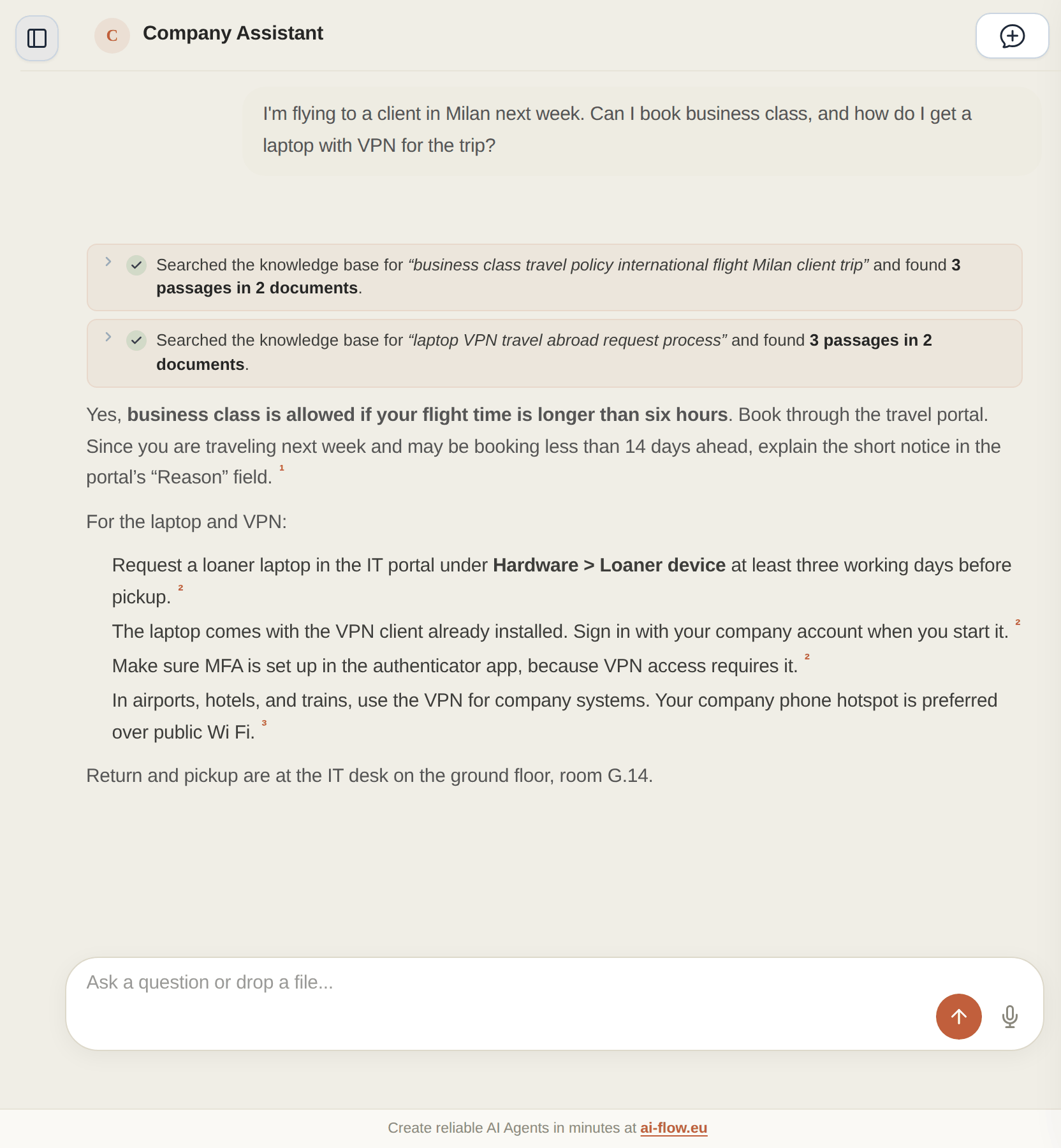
Someone asks about a business trip to Milan. The agent searches the HR policies for the travel rules and the IT handbook for the loaner laptop, then answers with footnotes to both.
Can I book business class to Milan?
How do I get a loaner laptop with VPN?
How many days can I work from another EU country?
What does error E-4012 on the label printer mean?
  • Each search line shows what the agent looked for and how many passages it found.
  • The small numbers in the answer open the source page.
An AI-Flow agent searches two knowledge bases and answers a travel question with footnotes.
How it works

How the agent finds the right passages

The agent combines several search methods and reads further when one passage is not enough.

01

Its own search queries

The agent turns the question into search terms and runs as many searches as the question needs, up to the step limit you set for the agent.

02

Several knowledge bases at once

Each knowledge base is its own tool. When a question touches HR and IT, the agent searches both at the same time.

03

Semantic and keyword search together

AI-Flow runs semantic and keyword search together and merges the results. Error codes and article numbers count as exact terms, so a search for E-4012 finds the passage that contains E-4012.

04

Whole documents when needed

If a passage is not enough, the agent lists the files in a knowledge base or reads a whole document. You can also add the neighbouring passages and the appendices you linked to a document.

05

A footnote for each statement

With "Return Sources Per Statement" switched on, each statement in the answer has a footnote with document and page. Click it to open the page next to the answer.

06

Scanned PDFs and diagrams

When you upload a scanned PDF, a vision model reads it page by page and describes figures and diagrams, so the agent can search them too.

Sources

Where the documents come from

You connect the places where your documents already are.

  • AI-Flow syncs SharePoint folders on a schedule and picks up new and changed files.
  • Websites sync through their sitemap or by following links, hourly, daily or weekly.
  • You can upload PDF, Word, PowerPoint, Excel and text files.
  • Vectors can stay in your own MongoDB Atlas cluster.
Quality

How you check the answers

You test an agent before more teams start using it.

  • You build test sets with expected answers and score the agent for groundedness, precision and recall.
  • You compare keyword, semantic and hybrid search on your own questions.
  • Employees rate answers, and you read the conversations behind the ratings.
  • The trace of each run lists every search, every passage and the cost.
Control

Who can use the agent and what you can see

You set access per agent, and AI-Flow logs every run.

An agent can be private, open to your organization or public with a password
Traces show each search and each passage the agent used
Optional redaction removes credentials and financial identifiers before indexing
AI-Flow runs in Heroku's EU region, with data in MongoDB Atlas in Europe
Next step

Try it on your own documents

Connect one knowledge base, ask the questions your team gets every week and check the footnotes.

Questions about figures? See Talk-To-Your-Data

Try AI-Flow yourself: Create a personal agent for free →