
Talk-To-Your-Data

Ask your data in your own words

The agent turns a question about figures into a query on your Excel file or database. AI-Flow runs the query on the data, and the agent answers with the numbers and a chart.

  • AI-Flow queries Excel and CSV files in a knowledge base directly.
  • You can connect PostgreSQL, MySQL and Microsoft SQL Server.
  • The agent draws bar, line, pie and scatter charts in the chat.
  • Each query appears in the trace of the run.
What this is

Figures from the source, explained in plain words

AI-Flow calculates totals and averages from the file or the database. The agent writes the question as a query and explains the result.

For employees
  • Ask for totals, averages, rankings and trends
  • Ask for a chart and get it in the chat
  • Open the tool line to see the query and how many rows matched
  • Ask about documents and figures in the same chat
In the app

Revenue per region, from a workbook

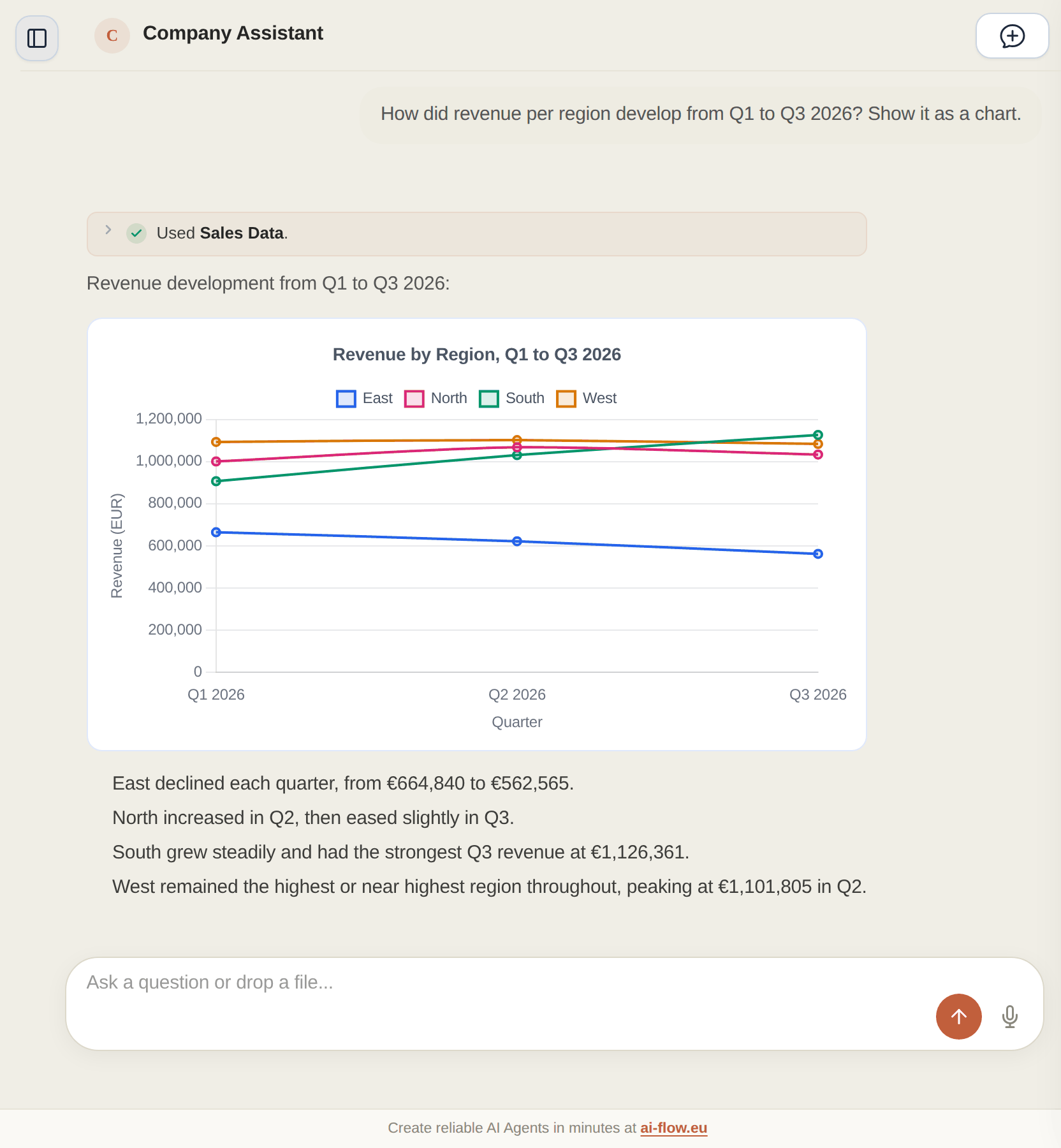
The agent sends one query to the sales workbook. AI-Flow adds up 108 rows by region and quarter, and the agent draws the result as a line chart.
Which region grew most from Q1 to Q3?
How many returns did region East have in September?
Show revenue per product line as a bar chart.
Which customers ordered more than 50 units last month?
  • We checked every figure in this answer against the workbook.
  • The tool line opens to show the query and the number of rows scanned.
An AI-Flow agent queries an Excel file and draws revenue per region as a line chart.
How it works

How a question becomes a number

AI-Flow calculates on the data itself and gives the agent the result to explain.

01

A query plan for spreadsheets

For an Excel or CSV file, the agent writes the query as filters and calculations. AI-Flow checks every column name against the file before it runs the plan.

02

Messy workbooks

AI-Flow reads each workbook once and notes its sheets, header rows, tables and column types. The agent gets that overview with every question.

03

SQL databases

Connect PostgreSQL, MySQL or Microsoft SQL Server. AI-Flow reads the table structure and writes SQL for each question. If the database reports an error, AI-Flow corrects the query once.

04

APIs and online spreadsheets

REST APIs with an OpenAPI description work as data sources too, and so do Google Sheets and Excel files in OneDrive.

05

Charts in the chat

The agent can draw bar, line, pie and scatter charts, box plots and heat maps. A chart is plain data, so no code from the model runs in the browser.

06

Documents next to the numbers

Give one agent a knowledge base and a data source. It can then answer with the return figures for region East and the section of the returns policy about them.

Set-up

What to switch on before the first question

These settings exist in the app today.

  • Turn on "Save original uploaded files" for the knowledge base that holds the spreadsheets.
  • Turn on "Draw Charts and Graphs" for the agent.
  • Connect databases with a database user that can only read.
  • Keep one table per sheet where you can, because a spreadsheet query reads one table at a time.
For data teams

Every query stays visible

You can check how the agent got each number.

  • The trace of a run shows each tool call with its input and its result.
  • A spreadsheet query returns up to 500 rows, and the agent sees when a result was cut.
  • AI-Flow stores database and API credentials encrypted.
  • Employees rate answers, and you read the conversations behind the ratings.
Control

Who can ask and what you can see

You set access per agent, and AI-Flow logs every run.

An agent can be private, open to your organization or public with a password
Traces show each query the agent ran
Credentials for databases and APIs are stored encrypted
AI-Flow runs in Heroku's EU region, with data in MongoDB Atlas in Europe
Next step

Try it on one of your own spreadsheets

Upload a workbook your team works with every week, ask the questions you usually answer by hand and compare the figures.

Questions about policies and manuals? See Agentic RAG

Try AI-Flow yourself: Create a personal agent for free →